

Complete the Look
Step Create Metaobjects
- Login to your Shopify store, click to Settings
- Click to Custom data --> Metaobjects and Click Add definition
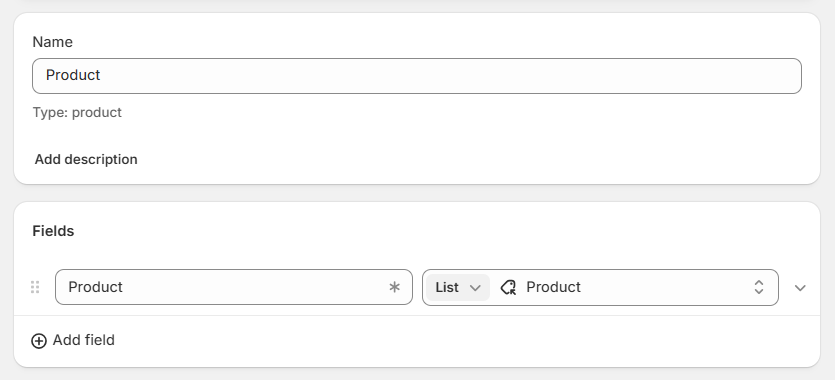
- Add metaobject definition with 1 fields as bellow:
- Name: Product
- Field 1:
* Name: Product
* Type: Product - List of value
Step Create Metafields
-
Back to Custom data -> Metafields -> Products
-
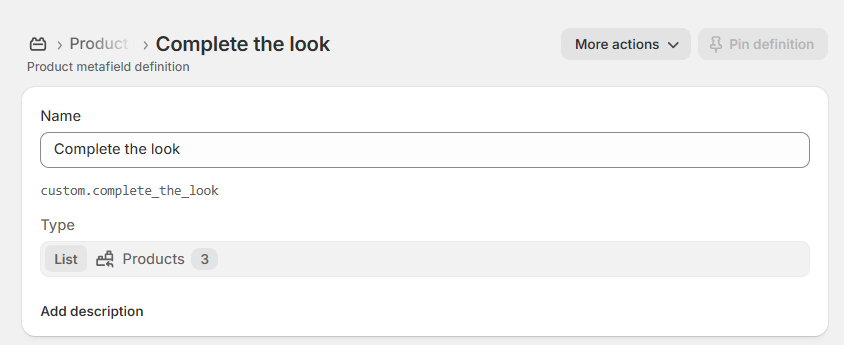
Add a metafield as bellow:
- Name: Complete the Look
- Type: Metaobject - List of entries
- Reference: Product
- Namespace and key: custom.complete_the_look
-
Setup metafield for a product and you can see the result.
Choosing the metafield (version 1.3.0)
The Complete the look section reads this content through its Complete the look metafield setting. The default key is custom.complete_the_look.
- Keep the default key above and it works with no extra setup.
- Or rename it: create the metafield under your own
namespace.key(for example, your brand name), then set Complete the look metafield to match. - Reuse on one page: create one metafield per copy (for example
custom.complete_the_lookandcustom.complete_the_look_2) and point each Complete the look metafield at its own key to show different content.
See How to setup Metafield in version 1.3.0? for details.
No comments yet