- Edit Product Page
- Breadcrumb
- Product Sidebar
- Left Sidebar
- Right sidebar
- Drawer sidebar
- Product Thumbnails Position
- Thumbnails Left
- Thumbnails Right
- Thumbnails bottom
- No Thumbnails
- Grid 1 column
- Grid 2 column
- Inner zoom 1
- Inner zoom 2
- External zoom
- Product summary
- General Option
- Product title
- Short description
- Product Review and Sold
- Product price
- Visitors counter
- Product custom field
- Custom HTML
- Product meta
- Trust badge
- Delivery and Return and Pickup availability
- Product form
- Stock countdown
- Product addons
- Size chart
- Show compare color
- Show Ask a Question
- Show share
- Product swatch
- Product label
- Custom TEXT
- Guarantee safe checkout
- Custom liquid
- More Products Color
- Countdown timer
- Product vendor logo
- Subscriptions
- Tab Review
- Tab Custom
- Setup Frequently Bought Together
- Variant Image Grouped
- Setup Stock notification form
- Setup Product group
- Products recently viewed
- Product recommendations
- Product information tabs
- Tab Description
- Layout 3
- Layout 2
- Layout 1
Product Description

Written by ThuHuong_FE_NextSky
Last updated
Product Description in our demo use "Grid, Columns" Bootstrap. It is powerful mobile-first flexbox grid to build layouts of all shapes and sizes thanks to a twelve column system, six default responsive tiers and dozens of predefined classes.
Learn how to modify columns with a handful of options for alignment, ordering, and offsetting here:
https://getbootstrap.com/docs/5.2/layout/grid/
https://getbootstrap.com/docs/5.2/layout/columns/
Product Description Layout:
General setting description layout:
Step 1: Login to your Shopify store, go to Products
Step 2: Add a new product or select a product you want to add a description
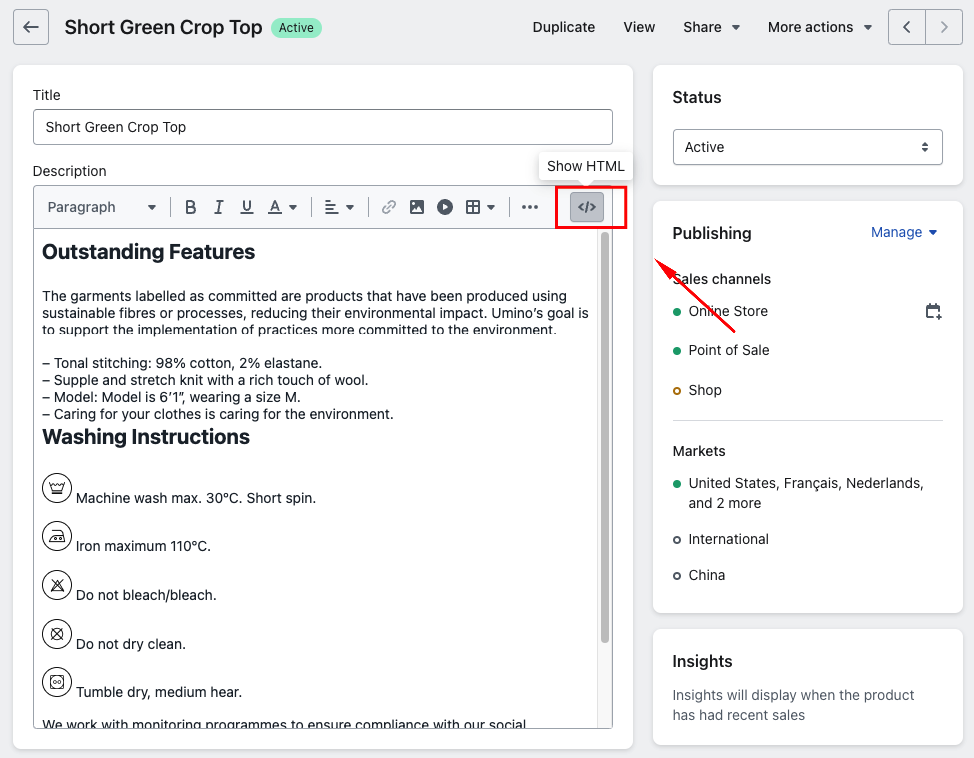
Step 3: Click to block code icon to change to Show HTML
You need to change to Show HTML before copy template so that the content will be shown like our demo store
Step 4: Copy the template layout you want to add and paste it into the Description