

Product grid
.png)
How to add a Product grid section?
Steps
- In the theme editor (Customize), open the template selector.
- Select Collections, then Default collection.
- On the left-sidebar, add Product grid.
- Make necessary changes > Save.
How to customize your Product grid section
General Settings
.png)
| Setting | Description |
|---|---|
| Section width | 3 options for section width
|
| Items to show per page | Limit the display of the number of page. Minimum: 4. Maximum: 24 |
| Columns per row on desktop | Number of columns to display on desktop computers. Minimum: 2. Maximum: 5. |
| Column gap | 4 options for column gap
|
Pagination type
.png)
.png)
.png)
Filtering and sorting
.png)
| Setting | Description |
|---|---|
| Enable sorting | When enabled, it will display sorting options for arranging products |
| Enable filtering | When enabled, it will display the configured filter options, allowing you to filter products |
| Show product counts | Display the quantity of product |
| Desktop filter layout | 3 options for desktop filter layout |
To customize filters in your store, you will need the Shopify Search & Discovery app.
This app not only enables you to tailor your filters but also grants you the capability to personalize search results and product recommendations, providing you with greater control over how customers explore and find your products.
Section padding
| Setting | Description |
|---|---|
| Top | Customize the top margin of the section |
| Bottom | Customize the bottom margin of the section |
Block settings
Promotion
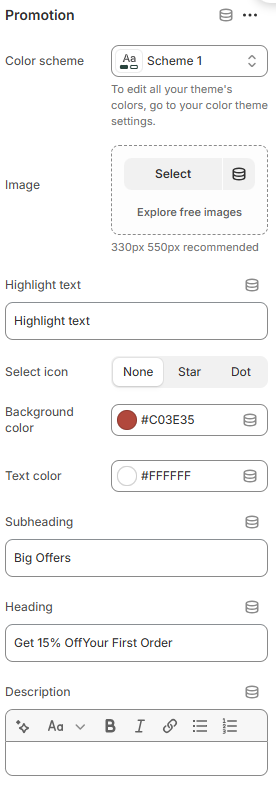
| Text | Description |
|---|---|
| Image | Upload banner promotion image (330px 550px recommended) |
| Subheading | Add a short line above the main heading. |
| Heading | Title of the promotion |
| Description | Supporting text to describe the promotion's message. |
| Button label | Name for the button |
| Link | The link URL you want to add |
| Promotion position | The banner will display if its position is equal to or less than the number of products in the collection; otherwise, it won't be shown. |
No comments yet